Testing with Flask send cookie with value correctly
Dec 26, 2020 · 2 minute read · 0 Commentsflaskpytestpython
I have used Flask tutorial code to improve my programming skills, I changed a few things that of it as part of my learning path. The repo with Flask tutorial modified is here.
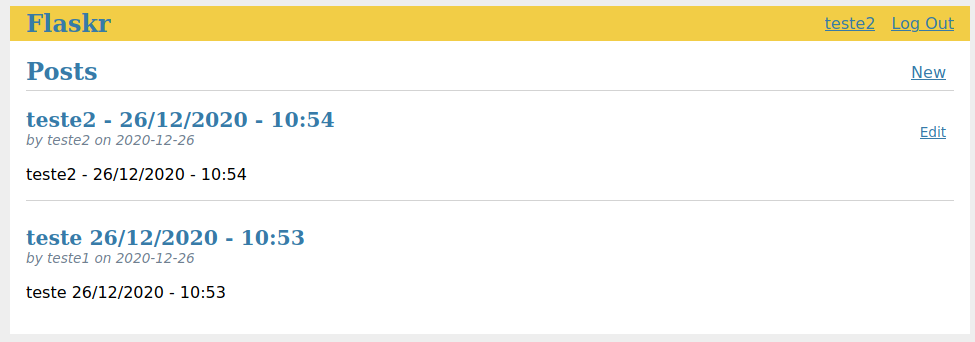
I implemented in the profile page an option to choose what’s the color of the top banner for all pages when a user is logged. After a user logged, Flask will create a cookie with the color banner if browser users don’t have it, read it and write response HTML in which the color banner in the user profile was saved.
It seems like the picture below:
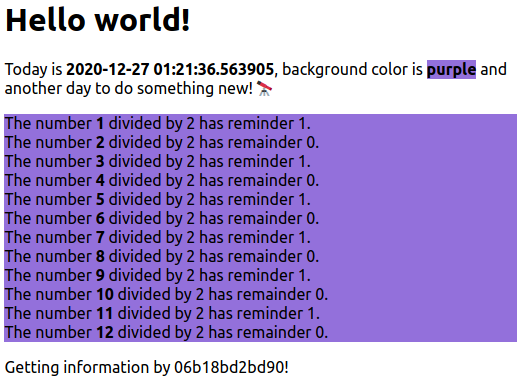
I thought that copy/paste here the Flask tutorial is bad, because I’ll have to explain more than I planned about changes of original code. So, I created another repo on Github that have a Flask project more simple. Basically, when receiving an HTTP Request from a browser, Flask will response it a random background color as part of text like the screenshot below:
I whished to test if the cookie is created correctly, but I tried to use as few as possible external libraries and methods of Flask and Python. This means that don’t use Python requests, for example. I think there is a way to extract cookies using only FlaskClient, but I didn’t find it (I guest I didn’t understand how to do that). I used regex to extract value from the cookie, although could be used a list comprehension, it’s an elegant solution. 😉
Below is Flask app.py code, up to date code can found here.
| from flask import Flask, render_template | |
| from flask import make_response | |
| from flask import request | |
| import random | |
| from datetime import datetime | |
| import socket | |
| from flask.globals import request | |
| app = Flask(__name__) | |
| def resp_html(rangenumbers, bgcolor, hostname): | |
| resp = make_response( | |
| render_template( | |
| 'index.html', | |
| the_date=datetime.now(), | |
| numbers=rangenumbers, | |
| css_bg=bgcolor, | |
| hostname=hostname)) | |
| return resp | |
| @app.route("/") | |
| def index(): | |
| rangenumbers = range(1,13) | |
| bgcolor = random.choice( ['orange', 'green', 'purple'] ) | |
| cookie_color = request.cookies.get('color') | |
| hostname = socket.gethostname() | |
| if cookie_color is not None: | |
| bgcolor = cookie_color | |
| response = resp_html(rangenumbers, bgcolor, hostname) | |
| else: | |
| response = response = resp_html(rangenumbers, bgcolor, hostname) | |
| response.set_cookie('color', bgcolor) | |
| return response | |
| if __name__ == '__main__': | |
| app.run(use_reloader=True, debug=True) |
This code creates a new cookie session called color, the value is written base on a random color list. If a color cookie exists, Flask reads the color cookie and writes a “span class” based CSS file.
| body{ | |
| width: 90%; | |
| margin: auto; | |
| font-family: "Ubuntu"; | |
| } | |
| .green { | |
| background-color: greenyellow; | |
| } | |
| .orange { | |
| background-color: orange; | |
| } | |
| .purple { | |
| background-color: mediumpurple; | |
| } |
The test catches the Set-Cookie header and parses the color cookie value compare to the color list supported.
| import re | |
| def test_cookie(app, client): | |
| del app | |
| response = client.get("/") | |
| assert response.status_code == 200 | |
| cookie_header = response.headers['Set-Cookie'] | |
| cookie_color = re.match('^color=(ligthgray|orange|purple)', cookie_header) | |
| cookie_match = str(cookie_color.group(1)) | |
| print(cookie_match) | |
| assert cookie_match in str(['ligthgray', 'orange', 'purple']) | |
Do you have a better way to test a cookie value using FlaskClient? Please, write in the comments.
Ouch, I almost forgot to mention an important thing. My Flask tutorial version implemented the cookie creation after the a user do the site logon, you can find the respective test here.